How to Apply for Production Access in Google Play Console (And Actually Get Approved)
Finished your closed test? Here's a step-by-step walkthrough of Google Play Console's 'Apply for access to production' form, with real example answers and tips to improve your odds of approval.
On this page6 sections
How to Apply for Production Access in Google Play Console (And Actually Get Approved)
You finished your 14-day closed test. Your testers found the bugs, you fixed them, and your app finally feels ready. Then Google Play Console throws one last gate at you: "Apply for access to production." Three steps, a pile of open-text questions, and no second chance to word things well.
I just went through this for Sift, my screenshot-sorting app. Below is exactly what each step asks, how I approached it, and the tips I'd follow again.
The last hurdle between a closed test and the Play Store.
✅ Before You Apply: The Checklist
- Your closed test has run for the required period with the required number of opted-in testers.
- You have real feedback you can point to (bug reports, requests, screenshots).
- You shipped updates in response, and testers re-checked them.
- You can honestly describe who the app is for and what value it gives.
Google's goal is to keep low-quality, spammy and abandoned apps out. Your job is to show a real test with real people.
📋 Step 1: About Your Closed Test
This step asks how you recruited testers, how easy it was, what engagement you saw, and what feedback you collected.
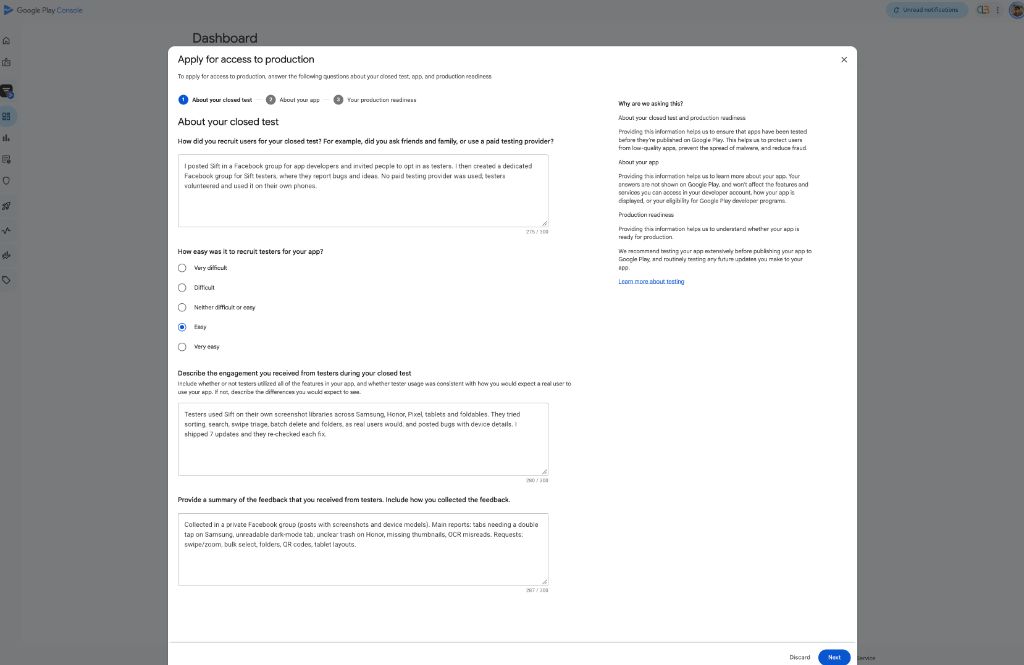
Step 1: recruitment, engagement and feedback.
- Be specific about recruiting. I explained I posted in a Facebook group for app developers, then created a dedicated tester group where people report bugs and ideas. I stated clearly that no paid testing provider was used.
- Describe real usage. Mention devices, features used and how many updates you shipped. I noted testers used Sift on Samsung, Honor, Pixel, tablets and foldables, and that I shipped 7 updates they re-checked.
- Summarize feedback with concrete examples such as device-specific bugs and feature requests, not vague "users liked it".
📱 Step 2: About Your App
Here you describe the intended audience, the value your app provides, and your first-year install expectation.
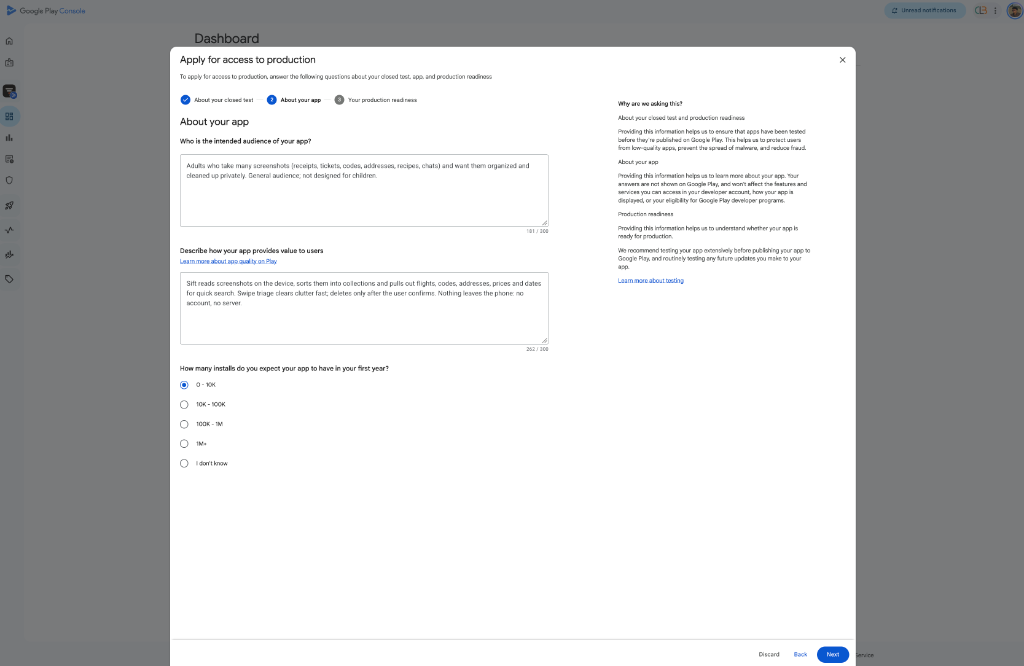
Step 2: audience, value and expected installs.
- Name the audience plainly. Mine: adults who take many screenshots and want them organized privately, not designed for children.
- Explain value in one breath. What it does, what the user gets, and anything that builds trust (for Sift: on-device, no account, no server, deletes only after confirmation).
- Choose realistic install numbers. Honest beats ambitious.
🚀 Step 3: Your Production Readiness
The final step asks what you changed because of testing, and how you decided the app is ready.
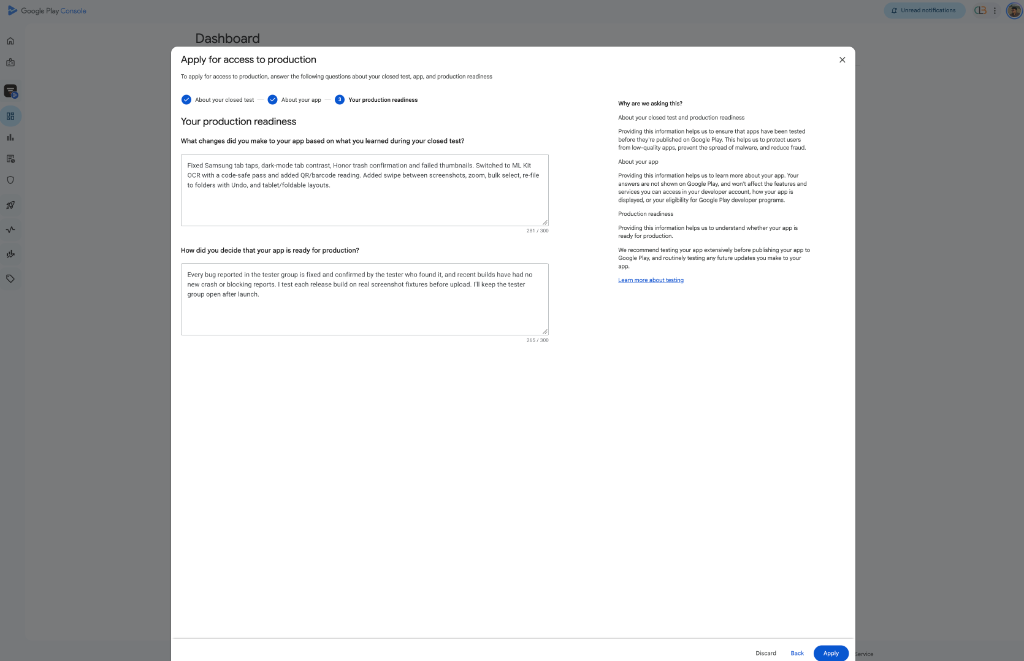
Step 3: changes made and why you're confident.
- List fixes as evidence. I named the specific issues: Samsung tab taps, dark-mode tab contrast, Honor trash confirmation, failed thumbnails, plus the features added from tester requests.
- Show your release discipline. I said every reported bug was confirmed fixed by the tester who found it, recent builds had no new crash reports, and I test each release on real devices before upload.
- Commit to keeping testers. I'll keep the tester group open after launch.
💡 Tips That Make Approval More Likely
- Be honest and specific. Concrete details read as real; generic filler reads as copy-paste.
- Mind the character limits. Each answer is capped at 300 characters, so lead with the most convincing facts.
- Keep your own record. Save screenshots of tester feedback and your changelog in case you need them.
- Don't pay for fake testers. Real, voluntary testers are your strongest answer.
- Plan for after approval. Keep updating and listening to feedback.
🎯 Final Thoughts
The production application isn't a trick question. Google wants evidence that real people tested a real app and that you responded to what they found. Tell that story clearly and you're in good shape. Submitted yours already? Share how it went in the comments.
Comments
Loading…